|
     |
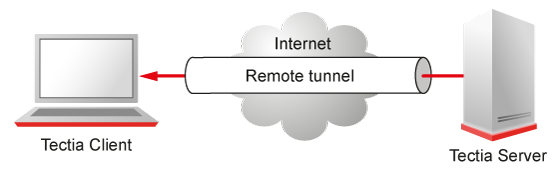
A remote (incoming) tunnel forwards traffic coming to a remote port to a specified local port.
With sshg3 on the command line, the syntax of the remote tunneling command is
as follows:
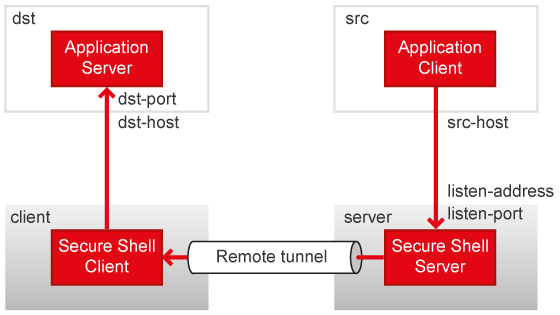
client$ sshg3 -R [protocol/][listen-address:]listen-port:dst-host:dst-port server
Setting up remote tunneling allocates a listener port on the remote server. Whenever a connection is made to this listener, the connection is tunneled over Secure Shell to the local client and another connection is made from the client to a specified destination host and port. The connection from the client onwards will not be secure, it is a normal TCP connection.
For example, if you issue the following command, all traffic which comes to port
1234 on the server will be forwarded to port 23 on the
client. See Figure 8.4.
sshclient$ sshg3 -R 1234:localhost:23 username@sshserver
The forwarding address in the command is resolved at the (local) end point of the tunnel.
In this case localhost refers to the client host.
By default, remote tunnels are allowed from all addresses for all users. The default
setting equals the following in the ssh-server-config.xml file:
<services>
  <rule>
    <tunnel-remote action="allow" />
    ...
  </rule>
</services>
The connections can be restricted by specifying allowed addresses with the
src and listen elements. If any addresses are specified as
allowed, remote tunnels to all other addresses are implicitly denied. See Remote Tunneling Rule Examples for usage examples.
The server starts listeners according to the current address family settings. For example,
if the server is configured for IPv4 only, the following command will start listener on port
2001, address 127.0.0.1:
client$ sshg3 -R 2001:localhost:2002 user@server
If the address family is any, two listeners will be started, on address
::1 and 127.0.0.1 on the same port 2001.
Using the Tectia Server Configuration GUI, the tunneling settings are made under the Services page on the Remote Tunnels tab. See Remote Tunnels.
This section gives examples on using the remote tunneling rules in the
ssh-server-config.xml file.
Figure 8.5 shows the different hosts and ports involved in remote port forwarding.
The following configuration allows opening a listener to port 8765 on the interface
10.1.60.16 on the server and allows connections to it from all addresses.
If this is the only tunnel-remote rule, attempts to open remote port
forwarding to other interfaces or other ports will be denied:
<rule>
  <tunnel-remote action="allow">
    <listen address="10.1.60.16" port="8765" />
  </tunnel-remote>
...
</rule>
The following configuration allows opening any port on any interface on the server but allows connections only from the listed addresses:
<rule>
  <tunnel-remote action="allow">
    <src fqdn="alpha.example.com" />
    <src fqdn="beta.example.com" />
  </tunnel-remote>
...
</rule>
By default, only users with administrative privileges can create listeners to
privileged ports (below 1024). To allow any user to create listeners to privileged ports,
enable the disable-privilege-check attribute, similar to the
following:
<rule>
  <tunnel-remote disable-privilege-check="yes" action="allow">
  ...
  </tunnel-remote>
</rule>
The following configuration denies opening ports 1-9000 on the server. If this is the
only tunnel-remote rule, it allows opening all other ports:
<rule>
  <tunnel-remote action="deny">
    <listen port="1-9000" />
  </tunnel-remote>
...
</rule>
The following configuration denies connections to ports 1-9000 from the listed
addresses. However, listeners can be opened to these ports (with ports 1-1023 restricted
to admin users only) and all other addresses can connect to them. If this is the only
tunnel-remote rule, it allows opening all other ports and allows
connections to them from all other addresses:
<rule>
  <tunnel-remote action="deny">
    <listen port="1-9000" />
    <src fqdn="gamma.example.com" />
    <src fqdn="delta.example.com" />
  </tunnel-remote>
...
</rule>
A rule like the above probably does not have any practical use. Nevertheless, it is shown here as an example of the rule logic.
| |