|
     |
The password authentication method is the easiest to implement, as it is set up by default. Since all communication is encrypted, passwords are not available for eavesdroppers.
On a Unix system, password authentication uses the
/etc/passwd or /etc/shadow file, depending on how
the passwords are set up. The shadow password files can be used on Linux and Solaris servers,
but not on AIX servers.
On Windows, password authentication uses the Windows password to authenticate the
user at login time. Also, if the SSH server allows it, users with administrator privileges may retain their permissions by adding
elevated, before their user name. For example:
$ sshg3 elevated,Administrator@example.com
To enable password authentication on the client, the
authentication-methods element of the
ssh-broker-config.xml file must contain an
auth-password element:
<authentication-methods>
...
<auth-password />
...
</authentication-methods>
Other authentication methods can be listed in the configuration file as well. Place the least interactive method first.
In connection profiles that will be used in non-interactive connections, it is also possible to use passwords stored to the Tectia Client configuration or to the system.
In the Connection Broker configuration file ssh-broker-config.xml, the stored
passwords are configured with the password element, with the following
syntax:
<profiles>
  <profile>
    <authentication-methods>
      <auth-password />
    </authentication-methods>
  ...
    <password file="path/to/file" />
  </profile>
...
</profiles>
The password element can be used to specify a user password that the
client will send as a response to password authentication.
The password can be given directly in the string attribute, but safer
alternatives are to define either a path to a file containing the password in the
file attribute, or to use the command attribute to
define a path to a program or script that outputs the password.
When using the command attribute to refer to a shell script, make sure
the script also defines the user's shell, and outputs the actual password. Otherwise the
executed program fails, because it does not know what shell to use for the shell script. For
example, if the password string is defined in a file named
my_password.txt, and you want to use the bash shell, include these
lines in the script:
#!/usr/bash
cat /full/pathname/to/my_password.txt
![[Caution]](images/caution.gif) | Caution |
|---|---|
If the password is given using this option, it is extremely important that the
|
![[Note]](images/note.gif) | Note |
|---|---|
Any password given with the command-line options will override this setting. |
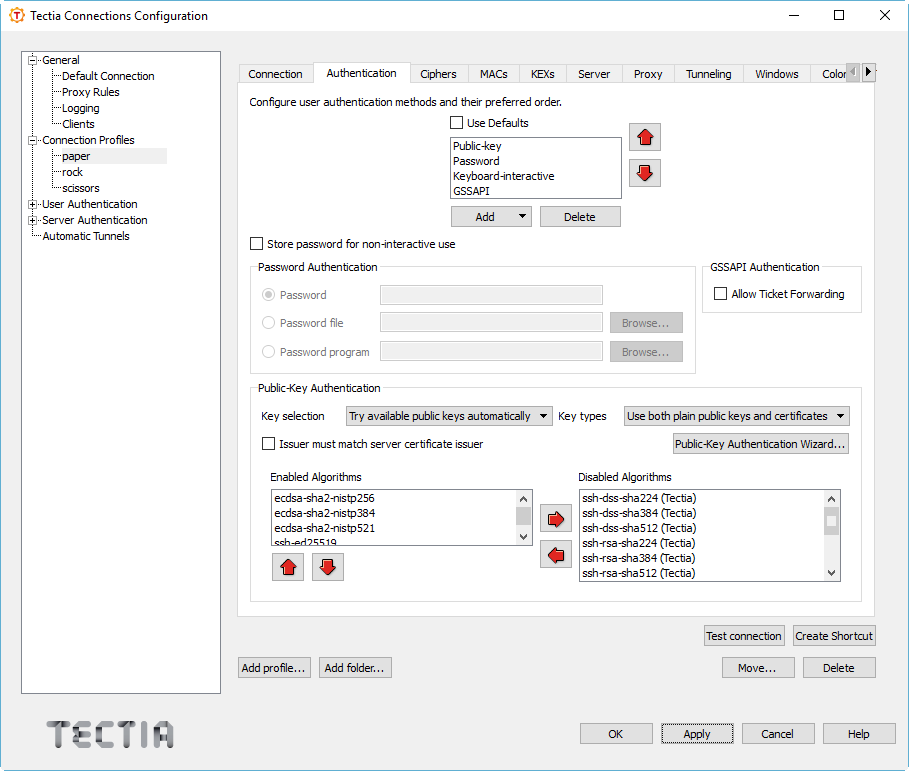
Via the Tectia Connections Configuration GUI, the stored passwords are configured on the Connection profiles → Authentication tab. Select Store password for non-interactive use and define the password or the path to the password file or program.
| Caution |
|---|---|
If you choose to use stored passwords, it is extremely important that the Tectia Client host and the password file or program are not accessible by anyone else than the intended user. |
To store the password as such in the configuration, enter the password directly in the Password field.
To use a file containing the password, select Password file and enter the path to the file in the field.
To use a program or a script that outputs the password, select Password program and enter the path to the program in the field.
| Note |
|---|---|
The user is required to have adequate permissions to the password file and to the
password program. The file or the program executable must be owned by the user, local
administrator or a member in the local admin group, and the file must have the
|
Using the Tectia Connections Configuration GUI to manage authentication methods is described in Defining Authentication.
| |