|
     |
The user authentication configuration in Tectia Server 6.x has been significantly upgraded as compared to 4.x and earlier versions. It is much more versatile but also more complex. This section includes several examples of user authentication configuration to give administrators an insight into what the new system can do.
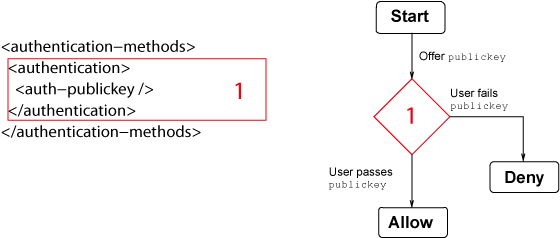
Figure 5.11 shows the simplest possible authentication chain example. It contains one authentication block, which contains one method definition.
When the server starts the user authentication exchange with the client, it
enters the authentication block marked with 1, gathers the list of methods
defined in it and sends that list to the client to inform it of the acceptable
authentication methods. In this example, only one method is allowed.
Whenever the user passes any one of the methods, it is considered to have satisfied the authentication block. After that, the server either proceeds to a nested authentication block, or if there are no further blocks to enter, marks the user as authenticated. Once the server has entered an authentication block, it will never exit it – the processing continues only inside the block.
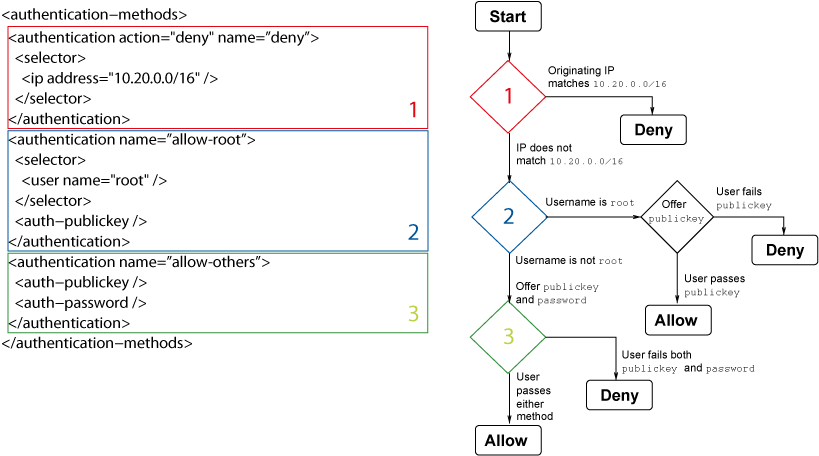
The example in Figure 5.12 demonstrates the use of multiple authentication blocks with selectors. Selectors match against information gathered during the connection attempt and may be used to control the user authentication process.
In this example, there are three authentication blocks on the same level. The authentication processing enters the first block that has a matching selector. A block without selectors always matches, so such block must always be the last in order.
The flowchart in the figure demonstrates the matching process. The server considers each authentication block in turn and either moves on or enters the block. Once a block has been entered, the processing is confined to that block only (and possible nested blocks inside it).
Each authentication block should either be a terminal block
(contain an action definition, "deny" or "allow") or continue the
processing by having either one or more authentication methods or nested authentication
blocks. (A block with no methods, nested blocks, or action definition, is considered to be
an allow block.)
The previous example showed how the server may be configured to select one authentication block from a list of multiple blocks using selectors. This allows the administrator to select a list of allowed authentication methods according to user name, originating IP address, and various other attributes.
However, this does not allow the administrator to require more than one authentication method. The way to do this is by creating a chain of nested authentication blocks.
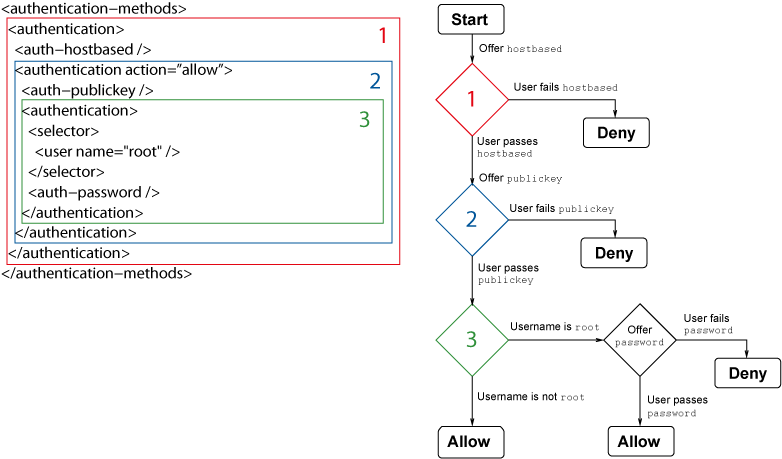
In the example shown in Figure 5.13, the top-level block
(marked with 1) contains one method definition, hostbased. When
starting the authentication exchange with the user, the server sends only that method as
allowed to the client. If the user fails that method, the whole authentication fails. If the
user passes the method, the server looks for a nested block (marked with 2),
forms a list of methods defined in that block and sends that list to the client. In this
example, the nested block contains the publickey method.
After the
user has passed public-key authentication, the server looks for further blocks for a
continuation. In this example, there is one nested block at the innermost level
(3). The block is selected only if the user is trying to log in as
root. In that case, one more authentication method is required.
If the user does not match to a nested authentication block, the action of the parent
authentication element is used (in this example, allow in step 2). Users
logging in with other user names than root will be allowed in after having
passed both hostbased and publickey earlier.
In step
2, the allow action is shown for clarity. The allow attribute can
also be omitted from the configuration as it is the default action.
This example contains only one method at each level and results in one method being required at a time. It would also be possible to have multiple method definitions at each level, in which case passing any one of the methods would allow the authentication to proceed to the next level.
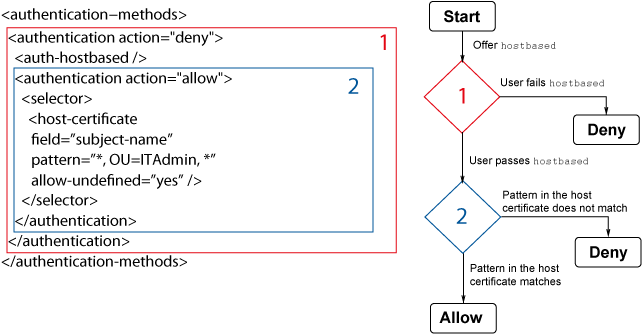
The example in Figure 5.14 illustrates using the deny action with nested authentication methods.
When the user authentication processing starts, the user is first directed to
a block with one authentication method, hostbased. If the user fails host-based
authentication, the processing immediately ends in failure.
If the user passes host-based authentication, the authentication state is still "deny" and the processing continues with a nested authentication block. This block matches if a host certificate with valid fields was used to pass the host-based authentication. In this case, no further authentication methods are required and the authentication ends in success.
However, if a matching certificate does not exist, the deny action of the parent authentication block is used and the authentication ends in failure.
The
allow-undefined attribute is included in the host certificate selector and
set to "yes". If it is omitted (or set to "no"), and the user
tries to authenticate with a normal host public key, the selector matching will end in error
because the host certificate data is not available to the server. In this example, the end
result would be the same from the user's point of view (login is denied), but the server
logs this as an error condition instead of an authentication failure. For more information,
see Selectors and Undefined Data.
| |