|
     |
Tectia Server is started automatically after installation and at boot time. Tectia Server uses a distributed architecture where the master server process launches several servant processes that handle the actual connections. The number of servants per master server process is configurable within certain limits. See General.
If the server needs to be started or stopped manually on AIX platforms, use the System Resource Controller (SRC) of the operating system.
To start Tectia Server, enter command:
startsrc -s ssh-tectia-server
To stop Tectia Server, enter command:
stopsrc -s ssh-tectia-server
On AIX, using startsrc starts two ssh-server-g3 processes. One process is so-called service launcher that interfaces with the SRC and the actual SSH server process. By using a separate service launcher, the SRC is able to start a new server process in the case that old server process has been stopped but it is still serving open connections.
You can also use ssh-server-ctl (Tectia Server control utility) to start and stop the server, but it will actually call the AIX system resource controller.
To start Tectia Server with the control utility, enter:
ssh-server-ctl start
To stop Tectia Server with the control utility, enter:
ssh-server-ctl stop
To manually start, stop, or restart the server:
On Linux with systemd:
# systemctl [command] ssh-server-g3
On Solaris, and Linux without systemd:
# /etc/init.d/ssh-server-g3 [command]
The command can be:
Start the server.
Stop the server. Existing connections stay open until closed from the client side.
Start a new server process. Existing connections stay open using the old server process. The old process is closed after the last old connection is closed from the client side.
Reload the configuration file. Existing connections stay open.
There are several ways to start and stop Tectia Server on Windows. Select a suitable method from below.
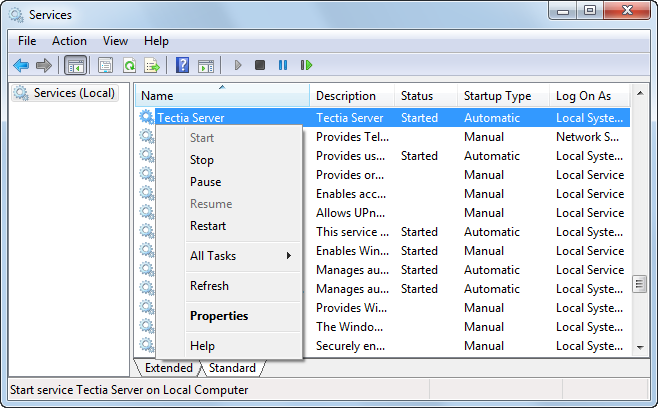
Using the Services Console:
From the Start menu, open the Windows Control Panel and double-click Administrative Tools.
Double-click Services. The Services console opens.
From the list, right-click on Tectia Server. From the shortcut menu, you can now Start, Stop, Pause, Resume, or Restart the server.
If the server is paused, the existing connections will stay open but the server will not accept new connections.
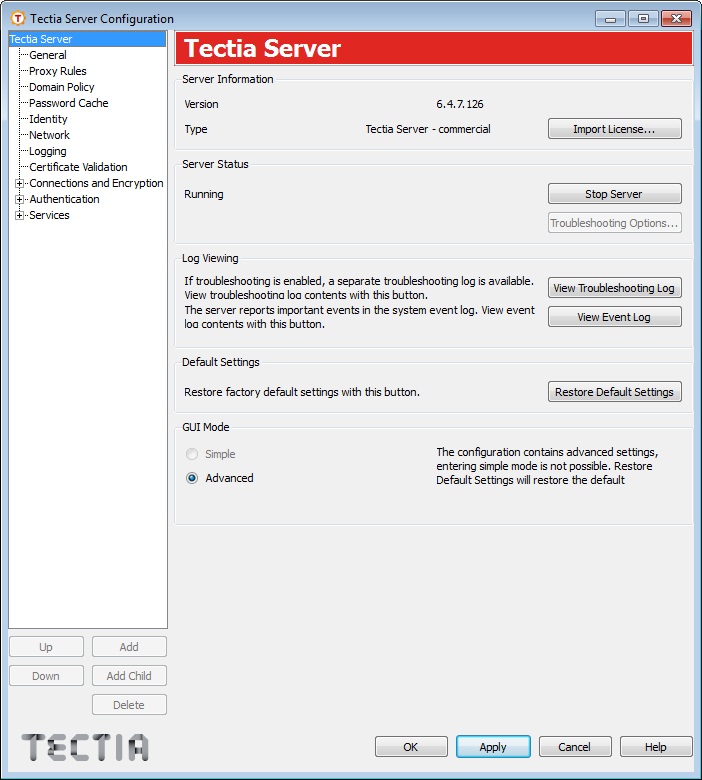
Using the Tectia Server Configuration GUI:
Open the Tectia Server Configuration GUI.
Click the Start Server button or Stop Server button. The button name and the function changes according to the state of the Server.
| |