|
     |
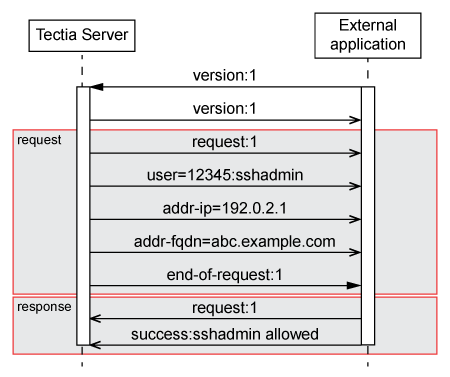
This section contains examples of communication sequences between Tectia Server and an external application.
The following figure shows an example of the sequence of messages exchanged between Tectia Server and an external application, resulting in a positive response.
In this example Tectia Server (S) uses an external application (C) to check if user with the id
45678 and user name jbrown from the IP address
192.0.2.2 in domain abc.example.com is allowed access.
The application gives a negative response:
C: version:1
S: version:1
S: request:1
S: user=45678:jbrown
S: addr-ip=192.0.2.2
S: addr-fqdn=abc.example.com
S: end-of-request:1
C: request:1
C: failure:jbrown not allowed from that subnet.
Tectia Server (S) uses an application (C) to check how many connections user
admin from the IP address 192.0.2.3 has made. The
application returns the number of connections:
C: version:1
S: version:1
S: request:1
S: user=34567:admin
S: addr-ip=192.0.2.3
S: end-of-request:1
C: request:1
C: number-of-connections=42
C: success:
| |