|
    |
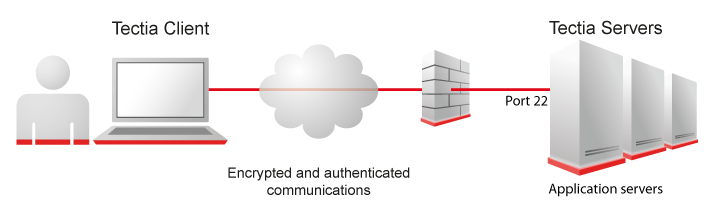
The Tectia client/server solution utilizes client-server architecture. By default, the server listens to TCP port 22, which has been officially assigned for Secure Shell, and clients initiate connections to this port. File transfer and application users typically connect via load balancer to the server cluster and system administrators to the cluster node.
The Tectia products work ideally together, but they can also be used with other Secure Shell-based clients or servers.
Tectia Client is a workstation product, available in English, and with additional license in Japanese, providing the Secure Shell client features and tools. Tectia Client takes care of securing remote connections and transfer of files. Users and system administrators need Tectia Client in order to access remote hosts running Tectia Server or another standard Secure Shell server. Tectia Client provides interactive file transfer and terminal client functionalities.
Tectia Client also includes advanced command-line tools for system administrators to set up secure automated file transfers, and tools for outgoing and incoming application tunneling.
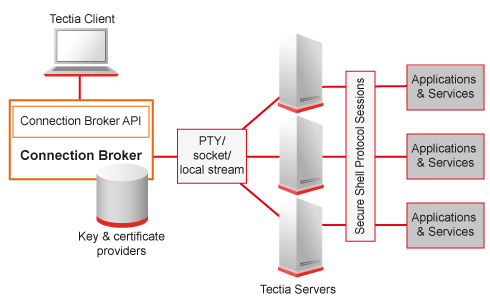
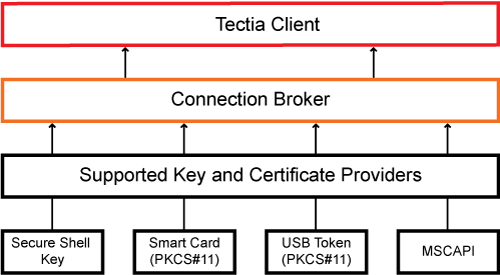
The Connection Broker is an integrated component of Tectia Client and Tectia ConnectSecure. The Connection Broker handles all cryptographic operations and authentication-related tasks on the client side. Connection Broker, by default waits for a few seconds after the last client quits before disconnecting from the server. If a client, like scpg3, reconnects, a new channel is opened inside already authenticated connection.
The Connection Broker as an authentication agent shown in Figure 1.3.
Tectia Server provides the Secure Shell server features and tools. It enables secure file transfers, secure application connectivity, and secure remote administration services over unsecured networks.
Tectia Server is a robust, flexible, and field-tested server implementation of the Secure Shell protocol with easy-to-use graphical user interface for configuring Tectia Server Its technology has been the choice of numerous large corporations, banks, financial organizations, and governments around the world.
Tectia Server provides strong user authentication, traffic encryption/decryption, and both traffic and file integrity checking. It also provides out-of-the-box interfaces to integrate to existing third-party authentication or authorization systems (such as Pluggable Authentication Modules, RSA SecurID, GSSAPI, PKI with CAC and PIV cards).
Tectia Server is available for Unix and Windows platforms, such as Oracle Solaris, IBM AIX, Ubuntu, SUSE and Red Hat Linux, and Microsoft Windows. The server license subscription includes also Tectia Client that can be installed on the same host.
Tectia Server offers all Secure Shell server functionality, including secure terminal, SFTP, and tunneling.
Tectia Server for IBM z/OS has been designed for z/OS platforms running on IBM mainframes. It provides the same services as Tectia Server on Unix and out-of-the-box support for direct MVS data set access and interactive data set listing, interfacing with JES, I/O streaming, configurable ASCII/EBCDIC code set conversions, ISPF application, and FTP compatibility commands, such as the SITE command. z/OS client side tools support FTP-SFTP conversion, transparent FTP tunneling, and enhanced file transfer (EFT) features.
Tectia Quantum Safe Edition makes Tectia quantum-safe for the future. It is a separate product enhancementad for Tectia Client/Server that can be enabled with an additional license without the need to reinstall Tectia products.
Tectia Quantum Safe supports multiple Post Quantum Cryptography (PQC) algorithms, including ML-KEM, CRYSTALS-Kyber, FrodoKEM and Streamlined NTRU Prime that are used in a Hybrid Key Exchange in SSH together with a classical ECDH algorithm. Both the PQC and ECDH algorithm contribute to the key material resulting in a session key that is at least as hard to break as the strongest composite. The hybrid approach mitigates the risk of future attacks on recorded secure shell sessions if weaknesses are discovered in either algorithm.
The FIPS 140-2 validation, and FIPS 140-3 validation does not cover hybrid algorithms themselves. However, the FIPS 140 series cryptographic of validation allows additional inputs for the validated key derivation functions. The PQC algorithms are used for generating such inputs, and therefore the use of PQC is allowed on FIPS-140 validated cryptosystems. For example, the ML-KEM PQC algorithm standardized by NIST as FIPS PUB 203 and used with ECDH NIST curve P384 in Hybrid Key Exchange in Tectia, can be used in FIPS mode.
| |