|
     |
This section lists the default locations where the installation process will store the Tectia Client executables, configuration files, the license file, and the user-specific configuration files.
On macOS platforms, the Tectia Client files are located in the following directories:
/etc/ssh2
/etc/ssh2/ssh-broker-config.xml: the global Connection Broker
configuration file (see ssh-broker-config(5))
/etc/ssh2/licenses: the license file directory (see Licensing).
/etc/ssh2/hostkeys: the global directory for known remote
host keys
/Applications/PrivX Desktop.app/Contents/MacOS/: Default PrivX Desktop
internal configuration and client binaries <INSTALLDIR> directory path.
<INSTALLDIR>/etc/ssh2/ssh-broker-config-example.xml: a sample file with
Connection Broker configuration examples
<INSTALLDIR>/opt/tectia/share/auxdata/ssh-broker-ng/ssh-broker-ng-config-1.dtd:
the document type definition (DTD) used with the Connection Broker configuration files.
Do not edit this file!
<INSTALLDIR>/opt/tectia/share/auxdata/ssh-broker-ng/ssh-broker-config-default.xml:
this configuration file is read first, and it holds the factory default settings.
Do not edit this file, but you can use it to view the default
settings. This file must be available and correctly formatted for the Connection Broker to start.
For the configuration options, see ssh-broker-config(5).
<INSTALLDIR>/opt/tectia/bin: user binaries such as sshg3
and ssh-broker-g3
<INSTALLDIR>/opt/tectia/man: the manual pages
<INSTALLDIR>/opt/tectia/lib: library binaries
The user-specific configurations are stored in the following directories:
$HOME/.ssh2/ssh-broker-config.xml: the user-specific Connection Broker
configuration file
$HOME/.ssh2: the default directory for user keys
$HOME/.ssh2/random_seed: the seed file for the random number
generator
$HOME/.ssh2/hostkeys: the user-specific directory for known
remote host keys
$HOME/.ssh2/identification: (optional)
the identification file used with public-key authentication
On Unix platforms, the Tectia Client files are located in the following directories:
/etc/ssh2
/etc/ssh2/ssh-broker-config.xml: the global Connection Broker
configuration file (see ssh-broker-config(5))
/etc/ssh2/ssh-broker-config-example.xml: a sample file with
Connection Broker configuration examples
/etc/ssh2/licenses: the license file directory (see Licensing).
/etc/ssh2/hostkeys: the global directory for known remote
host keys
/opt/tectia/share/auxdata/ssh-broker-ng: the Connection Broker configuration
file DTD directory
/opt/tectia/share/auxdata/ssh-broker-ng/ssh-broker-ng-config-1.dtd:
the document type definition (DTD) used with the Connection Broker configuration files.
Do not edit this file!
/opt/tectia/share/auxdata/ssh-broker-ng/ssh-broker-config-default.xml:
this configuration file is read first, and it holds the factory default settings.
Do not edit this file, but you can use it to view the default
settings. This file must be available and correctly formatted for the Connection Broker to start.
For the configuration options, see ssh-broker-config(5).
![[Note]](images/note.gif) | Note |
|---|---|
In Tectia Client 6.1 and earlier on Unix the default auxiliary data directory
|
/opt/tectia/bin: user binaries such as sshg3
and ssh-broker-g3
/opt/tectia/man: the manual pages
/opt/tectia/libexec: library binaries
/opt/tectia/lib/sshsecsh: library binaries
The user-specific configurations are stored in the following directories:
$HOME/.ssh2/ssh-broker-config.xml: the user-specific Connection Broker
configuration file
$HOME/.ssh2: the default directory for user keys
$HOME/.ssh2/random_seed: the seed file for the random number
generator
$HOME/.ssh2/hostkeys: the user-specific directory for known
remote host keys
$HOME/.ssh2/identification: (optional)
the identification file used with public-key authentication
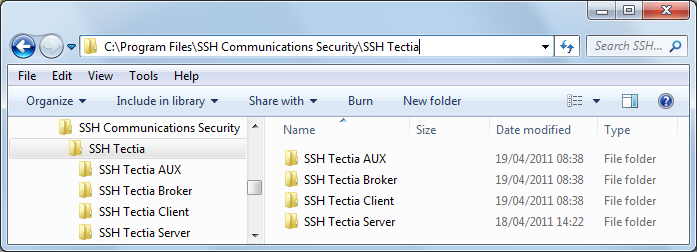
On Windows, the default installation directory (<INSTALLDIR>
below) for Tectia products is:
"C:\Program Files (x86)\SSH Communications Security\SSH Tectia" on 64-bit Windows versions
On Windows, the Tectia Client files are located in the following directories:
"<INSTALLDIR>\SSH Tectia Client": the binaries for
Tectia Client
"<INSTALLDIR>\SSH Tectia Broker": the Connection Broker binaries and
example configuration files
"<INSTALLDIR>\SSH Tectia Broker\ssh-broker-config.xml":
the global Connection Broker configuration file (see its manpage:
ssh-broker-config(5))
"<INSTALLDIR>\SSH Tectia
Broker\ssh-broker-config-example.xml": a sample file with Connection Broker
configuration examples
"<INSTALLDIR>\SSH Tectia AUX": auxiliary files and binaries
such as
ssh-keygen-g3.exe
"<INSTALLDIR>\SSH Tectia AUX\ssh-broker-ng": the Connection Broker
configuration file DTD directory
"<INSTALLDIR>\SSH Tectia
AUX\ssh-broker-ng\ssh-broker-config-default.xml": this configuration
file is read first and it holds the factory default settings. Do not
edit this file, but you can use it to view the default settings. This
file must be available and correctly formatted for the Connection Broker to get started.
For the configuration options, see ssh-broker-config(5).
"<INSTALLDIR>\SSH Tectia
AUX\ssh-broker-ng\ssh-broker-ng-config-1.dtd": the document type
definition (DTD) used with the Connection Broker configuration files. Do not
edit this file!
"<INSTALLDIR>\SSH Tectia AUX\licenses": the license
file directory (see Licensing)
"<INSTALLDIR>\SSH Tectia AUX\documents": the end-user
license agreements.
"C:\ProgramData\SSH\hostkeys": the global directory for known
host keys .
Figure 2.4 shows the Tectia directory structure in the Windows Start menu when several Tectia products have been installed on the same machine.
The user-specific configurations are stored in the directories as listed below.
%APPDATA%\SSH\ssh-broker-config.xml: the user-specific Connection Broker
configuration file with connection profiles
%APPDATA%\SSH\global.dat: the 4.x-6.x version Tectia SSH Terminal GUI configuration file
%APPDATA%\SSH\*.ssh2: the 4.x-6.x version Tectia Terminal GUI profile configuration
files
%APPDATA%\SSH\random_seed: the seed file for the random number
generator
%APPDATA%\SSH\HostKeys: the user-specific directory for known
remote host keys
%APPDATA%\SSH\UserKeys: the default directory for user public-key
pairs
%APPDATA%\SSH\UserCertificates: the default directory for user
certificate key pairs
%APPDATA%\SSH\identification: (optional) the
identification file used with public-key authentication
| Note |
|---|---|
The user-specific |
On Windows, the Tectia Client installation creates the following registry keys:
HKLM\SYSTEM\CurrentControlSet\Services\EventLog\Application\SSH Tectia
            Broker
HKLM\SYSTEM\CurrentControlSet\Services\EventLog\Application\SSH Tectia Broker
            GUI
HKLM\SOFTWARE\SSH Communications Security\SSH Tectia
HKLM\SOFTWARE\SSH Communications Security\SSH Tectia Client
HKLM\SOFTWARE\Wow6432Node\SSH Communications Security\SSH Tectia (on
x64 architecture, only)
HKLM\SOFTWARE\Wow6432Node\SSH Communications Security\SSH Tectia
            Client
(on x64 architecture, only)
| |